Identity Security and Zero Trust Access Control
Microsoft has developed Microsoft Entra, which is a single and unified identity and network access solution that has been developed to enable the implementation of Zero Trust architectures in cloud and hybrid infrastructures. Zero Trust is a security approach that assumes that no user and no device can be fully trusted. Every request is evaluated based on who you are, the security level of the device you are using, and the context in which you are making the request. Microsoft Entra can be used to authenticate users, enforce policies, detect potential threats, and provide security to the applications and data, both in the cloud and on-premise.
Microsoft Entra Platform Architecture
The Microsoft Entra platform is made up of various interconnected services that work together to provide full-spectrum identity and access security. At the core of the Microsoft Entra platform is the Microsoft Entra ID service, the cloud identity provider that performs authentication, authorization, and user management. Surrounding the core are various specialized services that expand the scope of security into governance, threat, and network access.
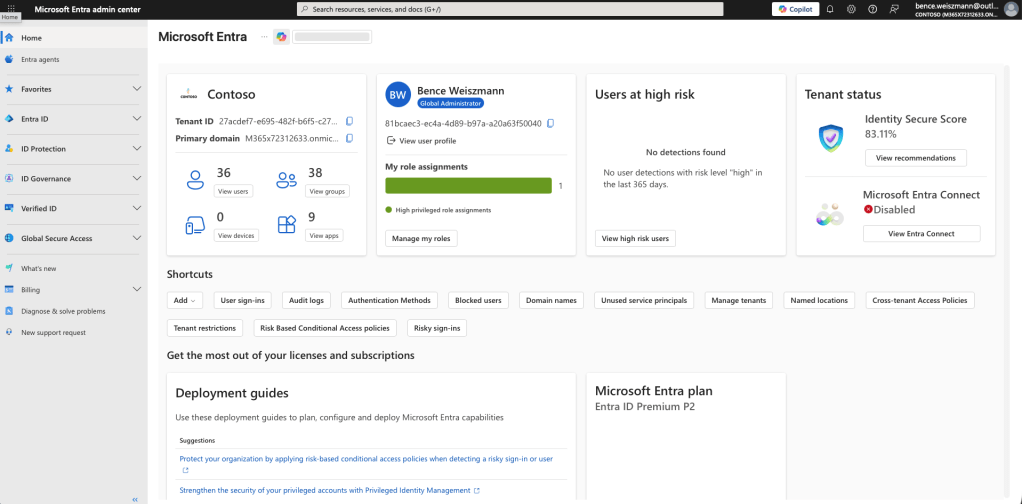
Identity risk monitoring is taken care of by the Microsoft Entra ID Protection solution, while administrative privileges are managed by the Microsoft Entra Privileged Identity Management solution. Lifecycle and entitlement management are under the umbrella of the Microsoft Entra ID Governance solution, which ensures the right level of access is granted at the right time during the life cycle of the user. For safe access to the network, the Microsoft Entra Private Access and the Microsoft Entra Internet Access solutions are available, which are part of the broader Global Secure Access solution.
Authentication and Token Issuance
The system also depends on modern identity protocols for sign-ins, such as OAuth 2.0, OpenID Connect, SAML, and a few others. So, for instance, when a person tries to sign in to an app, the app will ask Microsoft’s Entra ID to do the authentication, and the request is sent back to the app in the form of tokens.
In most cases, the process involves three tokens: the ID token, the access token, and the refresh token. While the ID token contains the details of the person’s identity, the access token contains the details the app needs to make the API call, and the third one, the refresh token, is used to fetch an access token without requiring the person to sign in.
An access token is a JSON Web Token, composed of three parts: the header, the payload, and the signature. While the header contains details regarding the algorithm and key ID used in the signature, the payload contains details such as the person’s ID, tenant ID, roles, groups, authentication modes, whether the device is compliant, and so on, depending on the public keys provided by Entra ID.
Conditional Access Policy Evaluation
Microsoft Entra heavily depends on Conditional Access for security purposes. Before any user gets a token for Microsoft 365, this feature examines all the attempts at login. It weighs your identity, the state of your device, your location, the state of your network signals, and a few other factors.
Conditional Access begins by collecting the signals. It includes your identity, your group membership, your device compliance, your location, your IP reputation, and other details. After collecting the signals, the policy engine determines the next course of action. The result is that access is granted, access is denied, or additional authentication is required.
Suppose there is a policy that needs a second step whenever a Global Administrator logs in from an unknown network. Conditional Access enforces this policy before the user gets the token. It does this in order to prevent any unauthorized access.
Device Identity and Compliance
These devices are referred to as identity objects in Microsoft Entra ID. This approach makes it easy for administrators to create security rules based on the level of trust they have in the devices. A device may be registered, possibly as BYOD, or may be joined or hybrid joined with an on-premise Active Directory and synced with Entra.
Usually, the Intune system is the one reporting the compliance status while keeping an eye on patch levels, disk encryption, endpoint protection, etc. Conditional Access policies will then be based on this compliance status, only allowing well-managed and secure devices access to sensitive apps.
Identity Risk Detection
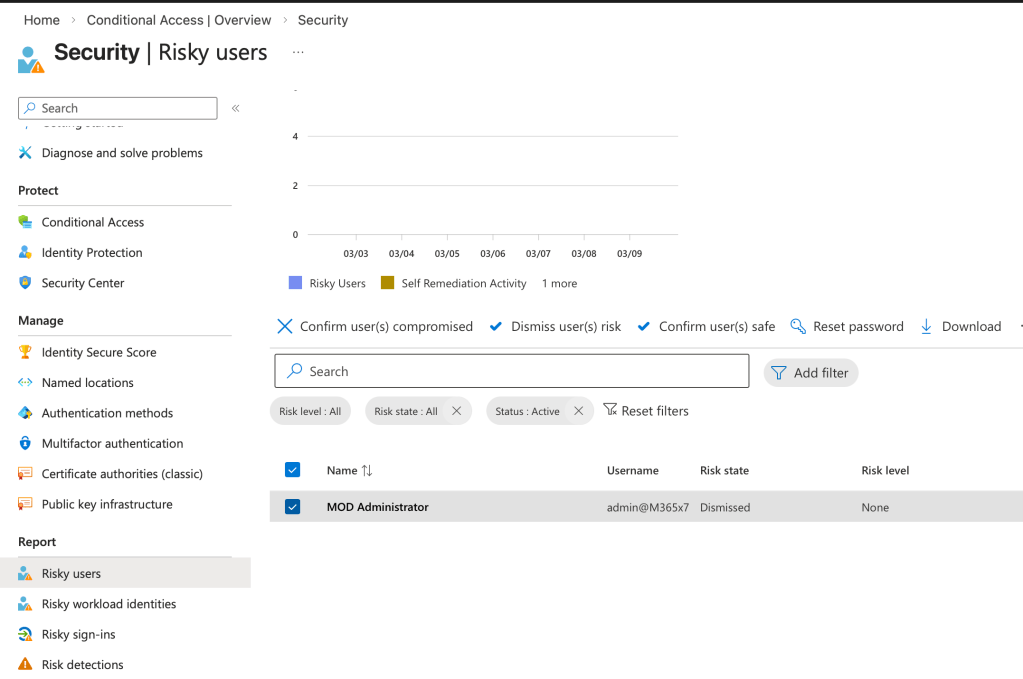
Microsoft Entra ID Protection is keeping a close watch on the signals for authentication. It sifts through the telemetry data to identify any strange activity. Using machine learning and global threat intelligence feeds and access to global threat intelligence feeds, it identifies impossible travel patterns, strange IP addresses, and stolen credentials.
The risk check is performed on two different levels: the user level and the sign-in level. The user risk is the likelihood that the credentials for the user have been compromised. The sign-in risk measures the likelihood that the attempt to sign in is malicious.
Automated remediation policies can be set up to remediate the account, such as forcing a password reset for a high-risk account.
Privileged Identity Management
Administrative accounts are among the top target categories for attackers. Microsoft Entra Privileged Identity Management helps to mitigate this kind of attack with its just-in-time privilege model.
Instead of having elevated privileges always enabled, users can activate administrative roles only when they need them. The activation process may even need to go through a series of steps, such as requiring a multi-factor authentication and approval from a manager. The administrative role will expire after a certain time. This reduces the time frame of having high-privilege accounts.
Identity Governance and Access Lifecycle
However, managing access rights in large numbers requires automation. For this purpose, admins can use the feature of creating access packages with the help of Microsoft Entra ID Governance. These packages can be automatically assigned to the users during the onboarding process or when the role of the employees changes or when the employees are assigned a new project.
Access rights can be reviewed by the system, and the permissions can be automatically removed when the employees leave the company or change their roles.
Global Secure Access
The contemporary and identity-centric access models include in-network access controls. Global Secure Access provides the ability for users to access internal apps in a secure fashion without the need for traditional VPNs, using Microsoft Entra Private Access, and enforces security policies for outgoing internet traffic using Microsoft Entra Internet Access.
This model checks identity, devices, and risk and then provides any access in a Zero Trust fashion, moving away from the old perimeter models.
Sign-In Logs and Threat Investigation
Each authentication action is recorded in detail through the Microsoft Entra admin center. In the sign-in logs, the user ID, IP address, status of the device used for sign-in, location, application used to sign in, method of policy evaluation, and the authentication methods used can be recorded.
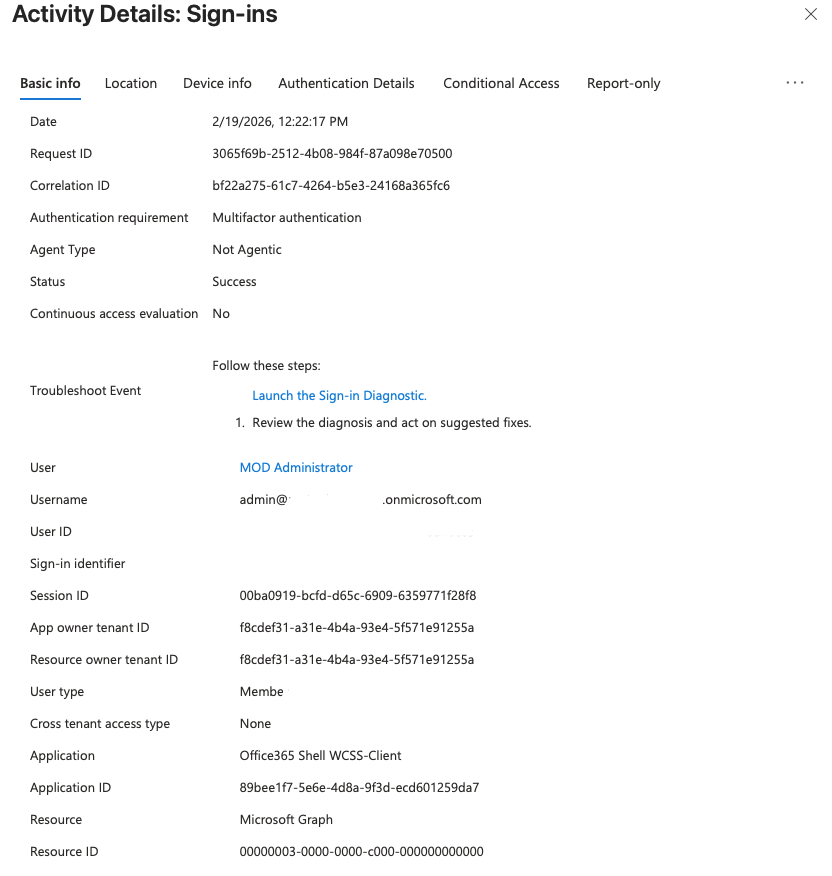
These sign-in logs can be used by the security team to identify unusual activity, like impossible travel or repeated sign-in failure, which could be indicative of compromised credentials. This can be done by exporting the sign-in logs to a security information and event management system.
Zero Trust Assessment — Practical Evaluation
It’s not just about flipping the switch and implementing a Zero Trust environment. It’s about understanding the state of your environment today. This is where the Zero Trust Assessment comes in. It is a tool and methodology that can help you easily and objectively determine the level to which your Microsoft 365 and Azure environment is aligned to the principles of Zero Trust.
Rather than manually going through each setting one at a time, the Zero Trust Assessment is an automated tool that will examine hundreds of different points in your environment through a PowerShell module. This will help you:
- Identify security issues before they become critical,
- Understand what is currently working well in the environment,
- And provide actionable steps to improve the environment.
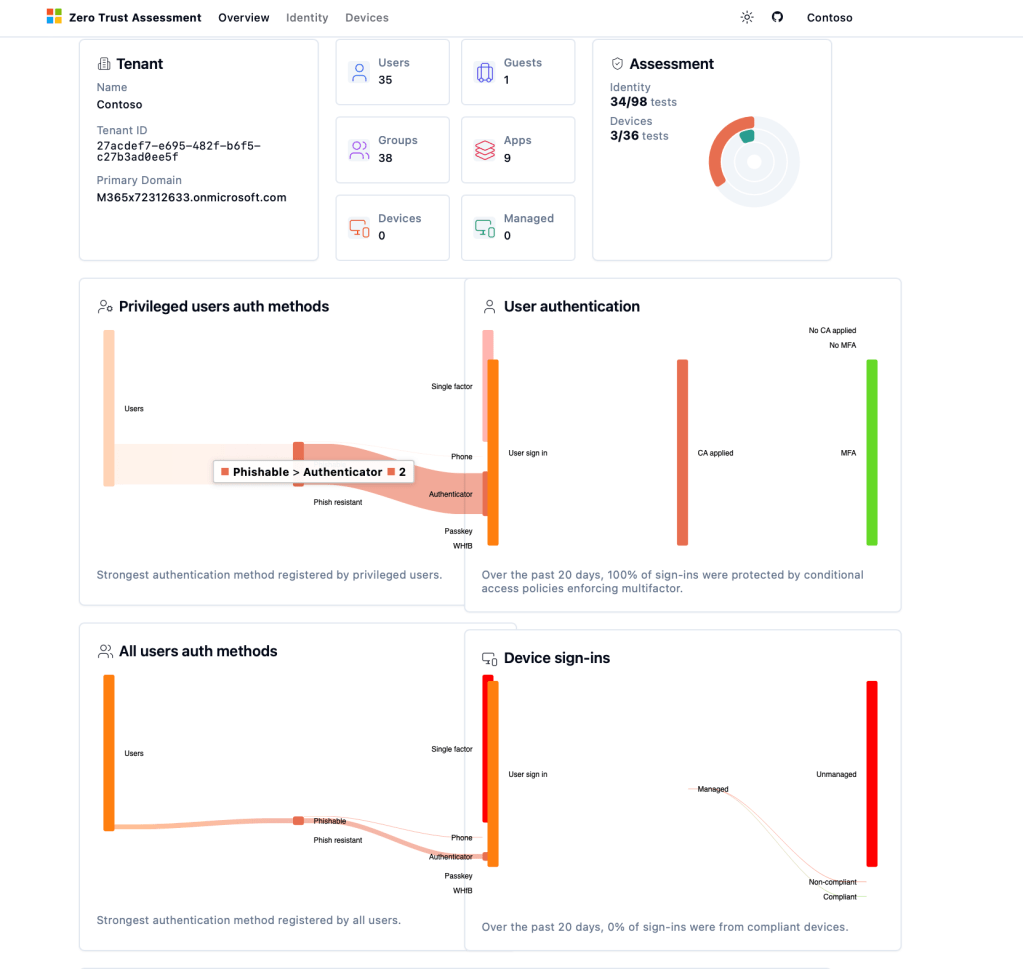
Why is the Zero Trust Assessment so important? In large environments, it can be time-consuming and difficult to go through each setting individually. This is because there is a chance for human error. With the Zero Trust Assessment, there is a transparent and scalable approach to understanding the state of your security environment and improving it over time.
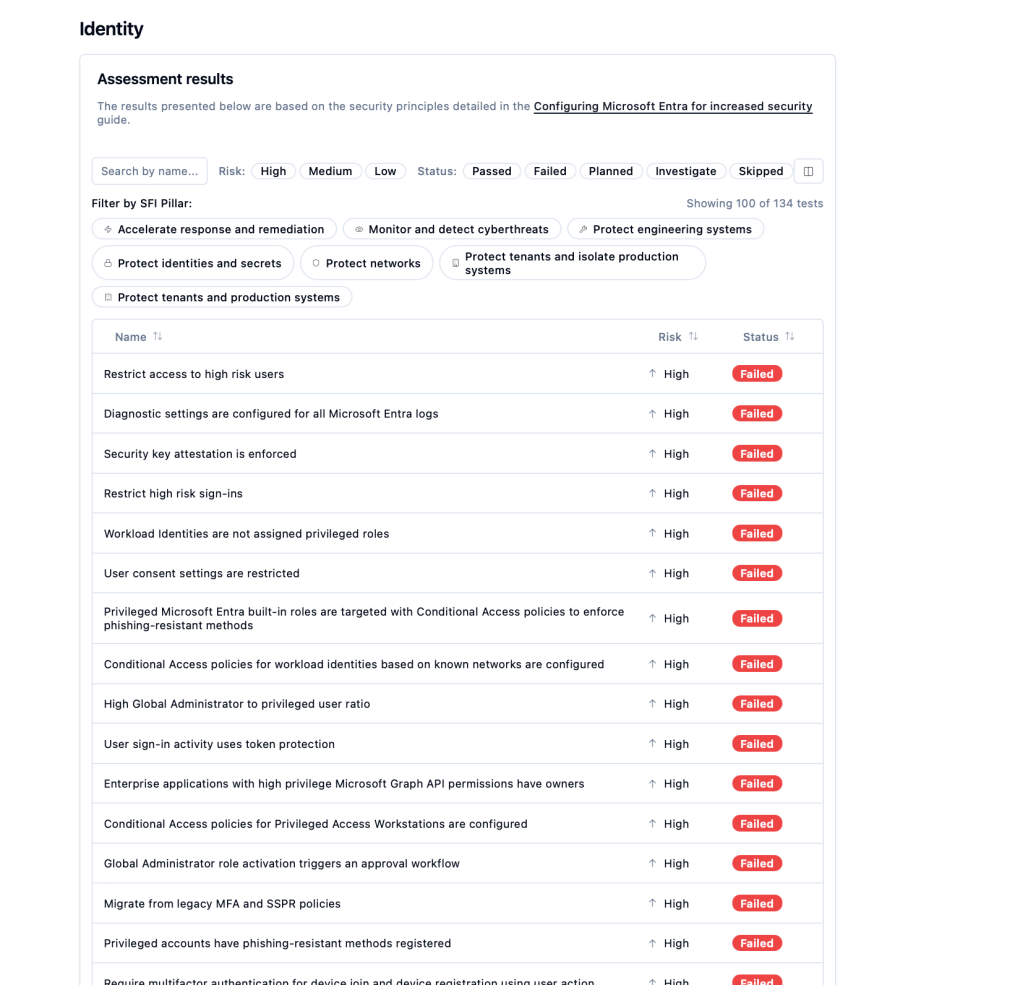
There is additional content that is available to help organizations reevaluate their state of Zero Trust maturity and provide a means to determine the best course of action. This will help organizations understand the most important aspects of the environment to improve.
Microsoft Entra ID Best Practices
Adopting Microsoft Entra is more than just flipping switches for identity services; it’s about embracing security best practices to reduce risk and strengthen identity protection.” In today’s cloud world, identities are a top target, and organizations need to make sure they are configured correctly in line with security best practices.
Enforce Strong and Passwordless Authentication
One of the most important aspects in the protection of identities is the enforcement of robust authentication practices. Multi-factor authentication (MFA) must be enforced for all users, especially for accounts with privileged access. MFA has been shown to minimize the threat of stolen credentials and breached accounts.
Organizations are increasingly turning to passwordless technologies such as Windows Hello for Business, FIDO2 security keys, and mobile-based authentication. This helps reduce reliance on passwords, which are commonly targeted by phishing attacks and brute force attacks.
Microsoft Entra password protection is also useful in the prevention of weak and commonly used passwords. Smart lockout is a feature that can be implemented in password protection.
Disable Legacy Authentication
Legacy protocols pose a security risk as they don’t support the implementation of advanced security features like multifactor authentication or conditional access.
Legacy protocols like SMTP, IMAP, POP, etc., should be disabled if possible. Applications should be encouraged to implement the latest authentication protocols like OAuth 2.0 or OpenID Connect.
Legacy protocols should be disabled to prevent hackers from bypassing the advanced security features implemented.
Secure Administrative Access
Administrative accounts are prime targets for attackers since they offer a high level of control in the identity infrastructure. To reduce this risk, administrative security practices must be implemented.
Administrative roles must not be permanently assigned to users. Instead, administrators must only activate roles when required by using just-in-time access with Microsoft Entra Privileged Identity Management.
Administrative activities must also be performed using secure workstations, thereby minimizing the chances that the credentials used by administrators can be compromised by attackers using phishing, malware, or compromised workstations.
Organizations must also implement the principle of least privilege, where users are only given the required level of privilege for their activities.
Emergency Access Accounts
Organizations must have at least two emergency access accounts, which are also known as break-glass accounts. These types of accounts can be used when administrators are locked out due to misconfigured Conditional Access policies and identity provider issues.
Break-glass accounts must be cloud-only accounts with strong authentication credentials and must be excluded from some Conditional Access policies.
Access to these types of accounts must be tightly controlled and monitored and must be used when the situation is critical.
Use Managed Identities for Services
Applications and cloud services usually require credentials to access other resources. Using credentials in application code or configuration files can cause security risks.
Managed identities are a more secure option as they allow Azure services to authenticate with other services without using credentials. The identity is managed directly through the platform, removing the need for developers and administrators to manage credentials manually.
This reduces the risk of credential exposure and makes it easier to manage identities for applications.
Group-Based Access Management
Permissions and roles should be granted to security groups rather than individual users. This will help in easier management and minimize the risk of configuration errors.
If access permissions are granted to groups, administrators can easily add or remove users from the group to grant access permissions. This is especially relevant for organizations with a large number of users.
Group-based licensing can be used to automatically assign Microsoft 365 licenses to users who are added to the group.
Centralized Logging and Monitoring
The monitoring of identity-related events is critical for detecting suspicious activities and responding to security-related incidents.
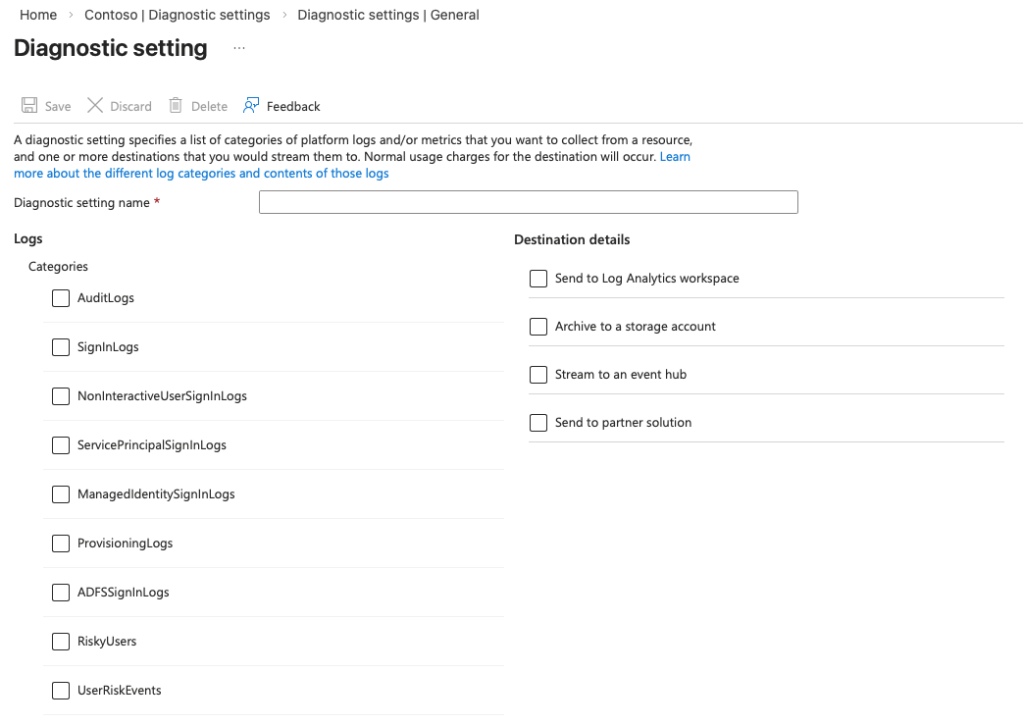
Microsoft Entra offers detailed audit logs and sign-in logs, which track authentication attempts, policy evaluations, device-related information, and authentication methods.
The audit and sign-in logs can be connected to security monitoring tools, allowing security teams to analyze and investigate events, identify abnormal sign-in activities, and identify possible security breaches.
Log retention and monitoring policies are critical for supporting compliance requirements and forensic analysis.
Conclusion
Your people, and their identities, are the new perimeter of security in our hybrid, cloud-first world. Attackers target identities, including account compromise, as well as the traditional target of the network. The importance of protecting identities, implementing a risk-based access model, and managing access to resources by people cannot be overstated in terms of ensuring the overall security of an organization.
Microsoft Entra is a comprehensive solution that offers a cohesive platform for authentication, token issuance, Conditional Access enforcement, risk detection, device compliance, privileged access, and identity lifecycle management. Microsoft Entra enables a comprehensive Zero Trust model by ensuring who is accessing resources, from where, via what device, in what session, and protecting our most critical resources.
 weiszmann.blog