In today’s cloud environments, identity isn’t just another component, it’s the foundation everything else depends on. Every login, every permission, every access decision flows through systems like Microsoft Entra ID.
And that has a very real consequence: when something breaks at the identity layer, it doesn’t stay contained. It spreads fast. Users can’t log in, admins lose access, applications stop working. In the worst cases, you’re effectively locked out of your own environment.
That’s exactly the kind of situation Microsoft Entra Backup & Recovery is designed to handle. But to understand why it matters, you have to look at it differently than a traditional backup solution.
Why traditional backup doesn’t really help here
When most people hear “backup,” they think about restoring data — files, databases, maybe entire virtual machines.
But Entra doesn’t fail because data is missing. It fails because configuration breaks.
What actually matters here is how everything is connected: users, roles, policies, authentication methods.
Take Conditional Access as an example. One small mistake in a policy can block every user from logging in, including administrators. No data is lost, technically. But access to everything is gone.
The same applies to role assignments or authentication settings. A change in the wrong place can ripple across the entire tenant in seconds.
That’s why backing up “objects” isn’t enough. What you really need is the ability to roll the system back to a state where everything still works.
What “state” actually means in Entra
When we talk about state in Microsoft Entra, we’re talking about more than just users and groups.
It’s the full picture of how access works at a given moment in time — policies, permissions, authentication rules, and how they all connect.
Conditional Access rules, MFA configurations, role assignments, application identities, they all play a part. And they don’t exist in isolation.
That’s what makes recovery tricky. A change in one place can have unexpected effects somewhere else. And fixing that manually, especially under pressure, is rarely straightforward.
How recovery actually works
Instead of relying on backups, Entra Backup & Recovery monitors the changes to your environment over time.
You can think of it as a timeline of your tenant. Any changes to the configuration become part of the timeline.
If something is broken, you don’t have to guess how to fix it. You can go back to a point when things were working correctly and restore from there.
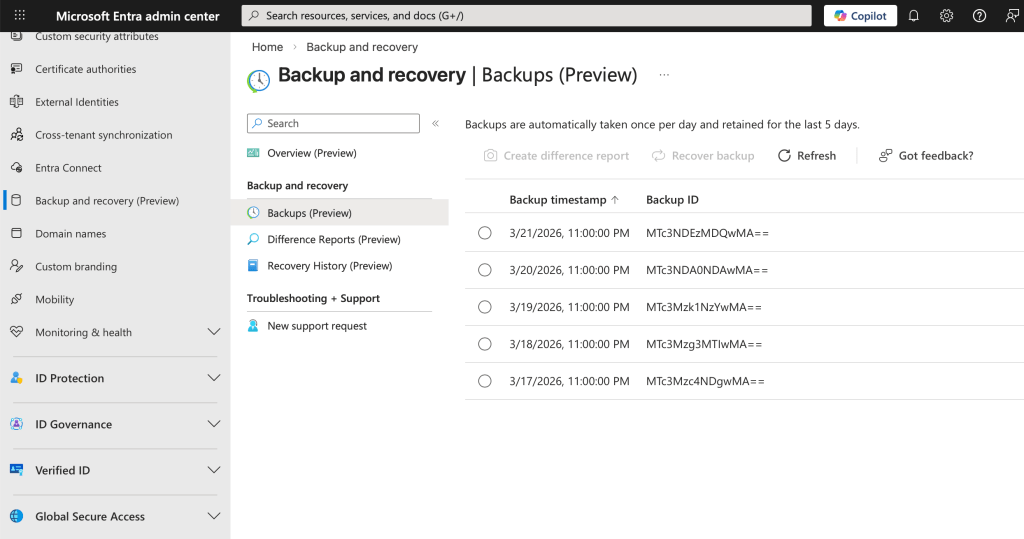
Sometimes you might be fixing a single object. Other times you might be rolling back the entire configuration. In any case, you know you’re fixing things because you’re going back to a working state.
Of course, the above isn’t exactly like the undo button you might be thinking of. The reason is that Entra is a distributed system, which means everything is connected to everything else. Restoring a single object without taking into account the connections to other objects can result in a state that isn’t entirely working.
Where this really matters in practice
Most real-world issues in Entra don’t come from data loss. They come from changes, often small ones — with bigger consequences than expected.
Conditional Access is the classic example. A rule that looks correct on paper can end up blocking all authentication, including your own.
Automation is another common source of problems. Scripts that modify users or permissions at scale can introduce issues in minutes, and fixing them manually is painful.
Then there are security incidents. If someone gains enough access to modify authentication settings or policies, they can effectively take control of the environment. In these cases, speed matters. Being able to roll back to a clean state can make all the difference.
Identity is now the control plane
The reason all of this is so critical comes down to how modern cloud systems are built.
Microsoft Entra sits in the middle of everything. Microsoft 365, Azure, and most SaaS applications rely on it for authentication and access control.
So when Entra breaks, it’s not just an identity problem, it’s an everything problem.
And that’s why traditional backup strategies fall short. Protecting data doesn’t help if nobody can access it.
Making it work in the real world
Entra Backup & Recovery is powerful, but it’s not something you can rely on in isolation.
It works best as part of a broader identity strategy.
Careful change management reduces risk, especially around high-impact configurations like Conditional Access. Testing and gradual rollouts prevent many issues before they reach production.
Limiting administrative access also matters. The fewer people and systems that can make critical changes, the lower the risk.
And even with all that, you still need a fallback. Emergency access accounts — the “break-glass” approach — are essential when everything else fails.
On top of that, visibility is key. Monitoring and auditing changes help you catch issues early, before they turn into incidents.
Conclusion
Microsoft Entra Backup & Recovery isn’t really about backup in the traditional sense. It’s about restoring control when the identity layer breaks.
And in modern cloud environments, that’s what matters most.
 weiszmann.blog